What You're Watching
The video above is an unedited, 2× screen recording of a real house creation on Polygon Amoy. The house is named "World Cup Football fans." From the first keystroke to the on-chain transaction confirmation, the whole process takes under five minutes.
The payment was made entirely through MTN Mobile Money — no MetaMask, no seed phrase, no browser extension. The receipts at the bottom of this article are the real confirmations from that session.
The 6-Step Creation Wizard
The wizard walks you through six screens. Here is what happens at each one.
Step 1 — House Details
Give your house a name and a short description. The name appears on your members' dashboards and in the on-chain contract. The description is stored off-chain in Firestore.
In this recording: the house was named World Cup Football fans, created to pool contributions ahead of the tournament.
Step 2 — Members & Mobile Money
Invite members to your house and configure how they contribute. Members join using either a crypto wallet address or an MTN / Orange Money phone number. As the organiser, you are always Member #1.
For each member, you define the financial terms:
- Contribution amount — in USDC (converted from MoMo on the fly)
- Frequency — Weekly, Bi-weekly, or Monthly
- Max members — 2 to 20 slots in your house
- House Tier — Tier 1 (Open), Tier 2 (Trusted), or Tier 3 (Verified)
- Grace period & late fee — how many days before a missed payment triggers a penalty
- Aave yield — optionally earn passive yield on pooled funds between payouts
The wizard auto-calculates the total pool size so everyone sees what they're signing up for. If you enable the MoMo bridge, the platform creates a dedicated on-chain address for your house and routes all payments through the CamPay oracle.
Step 3 — Contribution Settings
Final confirmation of how much each member contributes, how often, and the rules governing late payments and payouts.
Step 4 — Ballot Draw
The ballot assigns a payout round to each member slot using a Fisher-Yates shuffle. As organiser (Member #1), you receive whichever round the draw assigns to slot 1. You can re-run the ballot as many times as you like before deploying — once the contract is deployed the order is immutable and publicly verifiable on Polygonscan.
Step 5 — Review
A summary of every setting you configured. Nothing is written to the blockchain until you move to the next step. This is your last chance to edit — go back to any step using the breadcrumb navigation at the top.
Step 6 — Deploy
Click Deploy House and choose how to pay the gas + creation fee:
- MTN or Orange MoMo — dial the USSD code shown, or use the MoMo app. No wallet needed.
- USDC wallet — connect MetaMask or any WalletConnect wallet and sign the transaction.
Once the payment is confirmed by the oracle:
| Stage | Time | |---|---| | Firestore metadata written | Instant | | Smart contract deployed to Polygon | ~30 seconds | | Contract verified & indexed | 1–2 minutes | | Total from first screen to live house | Under 5 minutes |
Your House, Live in the Dashboard
After deployment, your house is instantly live on Polygon and visible in your dashboard. You can see it listed with all your other active savings circles, ready to accept contributions from members.
Real Transaction Proof
The receipts below are from this exact recording session. The house creator is based in Dubai, UAE; the MoMo payment was initiated from Cameroon. Both confirmations arrived within seconds of each other — they show different clock times only because the two devices are in different time zones.
MTN MoMo Text Confirmation — Cameroon (WAT, UTC+1)
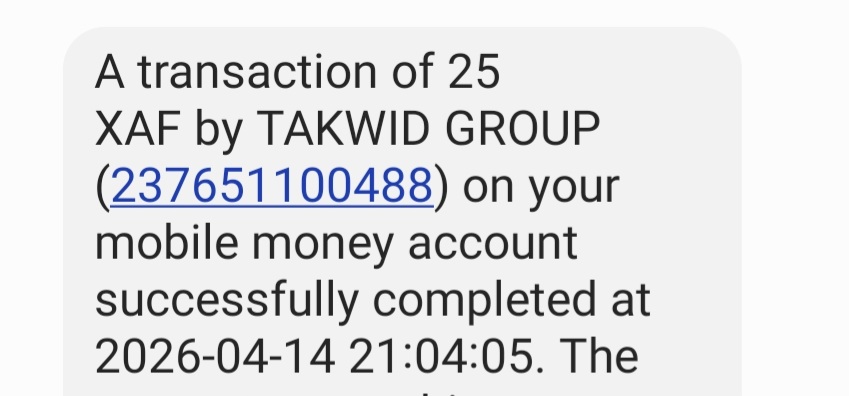
21:04:05 on 14 April 2026, West Africa Time (UTC+1). MTN confirms 25 XAF was debited from the sender's account and credited to the TAKWID GROUP merchant number.
CamPay Email Confirmation — Dubai (GST, UTC+4)
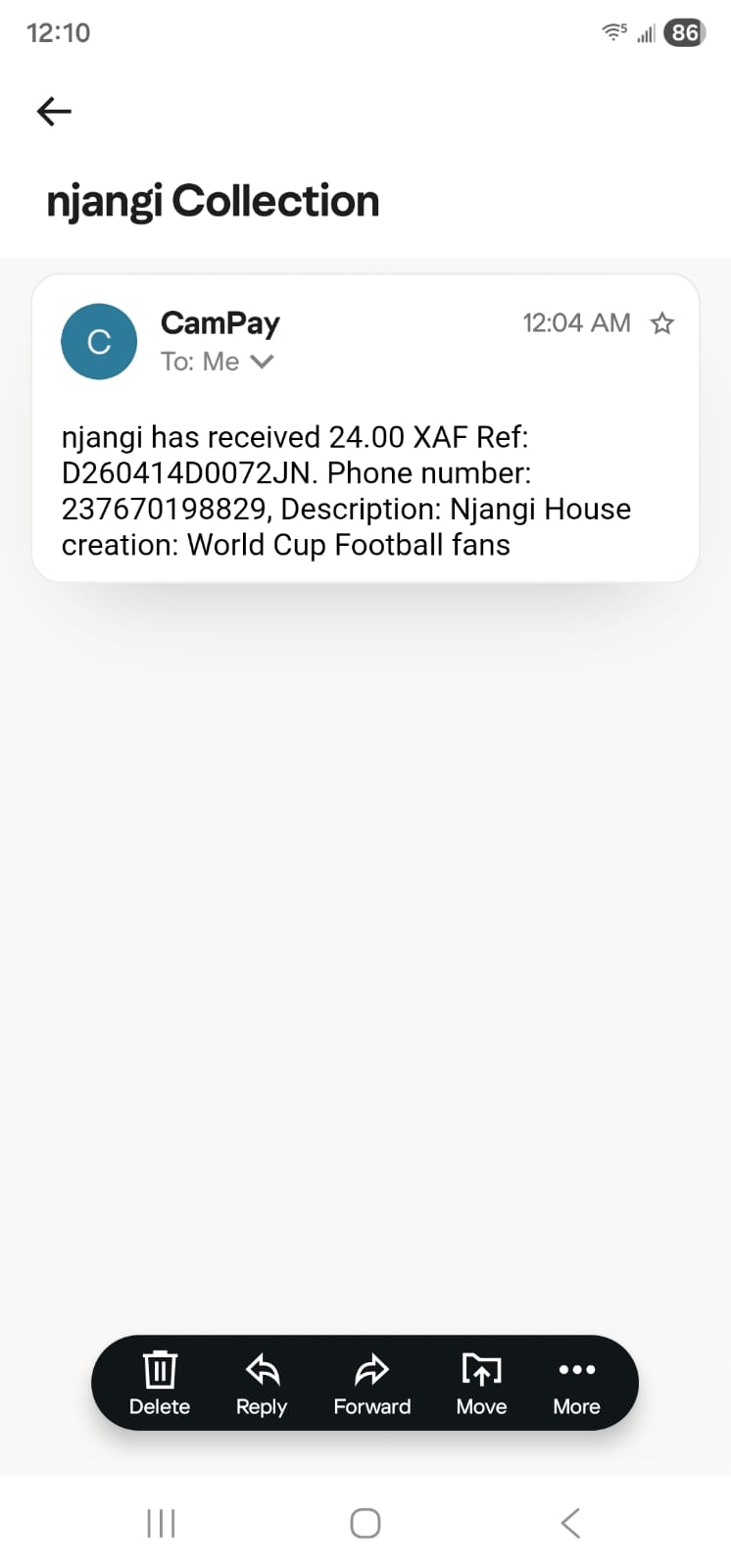
12:04 AM on 15 April 2026, Gulf Standard Time (UTC+4). The creator's phone received this email notification at midnight Dubai time — exactly the same instant as 21:04 Cameroon time (3-hour offset). CamPay confirmed receipt of 24 XAF after deducting a 1 XAF MTN network fee.
Both receipts confirm the same transaction. 21:04 WAT = 00:04 GST. The bridge settled in real time.
Why This Matters
Traditional ROSCAs require:
- Physical cash handover or bank transfers with 2–3 day clearing times
- WhatsApp group accounting and manual tracking
- Trust without any on-chain guarantee
Njangi House replaces all of that. The smart contract holds the funds, enforces the rotation order set by the ballot, and releases payouts automatically. Mobile Money users never need to learn what a blockchain is — they just dial a USSD code they already use every day.
Try It Yourself
The wizard takes less than five minutes. The receipts above are proof.